 Skip to content

Gemini for Small Business South Africa: 7 Practical Workflows
By David Gous · · Google sources checked 27 October 2026
Categories: Small Business Marketing · Digital Marketing
Tags: Gemini for Small Business · Google Gemini · AI Marketing Workflows · Google Business Profile
When the workflow produces a brochure or price list, the searchable PDF publishing guide adds checks for text, reading order and current-version links. Gemini for small business can help South African owners turn verified business information into useful marketing drafts, clearer service pages and better enquiry handling. Start with one offer, one page and one enquiry journey. Our WhatsApp Business enquiry guide shows how to connect that page to a monitored conversation. Check account eligibility, review every public claim and measure whether the finished work helps customers take the next step.
A busy owner does not need another folder of unfinished AI copy. For seasonal retail preparation, follow the 30-day Black Friday preparation plan to connect product information, accurate offers and checkout checks. A Mitchell’s Plain contractor needs customers to understand the work covered. A Bellville retailer needs accurate stock and collection information. A Cape Town tour operator needs enquiries that include a workable date and party size. This guide shows how to use Gemini for small business around those practical jobs, with prompts, worked examples and checks before anything goes live.
In this guide
What changed in Gemini for small business in October 2026?
Google’s 20 October announcement introduced a business hub, brand-style tools, marketing and finance skills and additional app connections. Google described a global rollout beginning in the following days. The announcement is useful context, but does not prove that every feature is visible in your account today.
Gemini for small business is an approach to using the assistant, not a promise that one subscription includes every Google business product. The Gemini app, Gemini within Workspace and Gemini Enterprise have different account arrangements. Check the exact product before paying or connecting business information.
The distinction that matters most for Easy Rank readers is this: using Gemini to draft content does not buy a recommendation in Gemini or Google Search. Content production, organic discovery and paid advertising are separate activities. Our ChatGPT Ads South Africa guide explains the advertising side. The workflows below focus on preparing useful business assets.
Is Gemini for small business available in South Africa?
The Gemini web app supports South Africa. Specific business features still have eligibility conditions. Check Google’s supported countries and the controls visible in your account.
For the direct Google Business Profile connection, the current requirements include being 18 or older, using a personal Google Account associated with only one verified profile and having Keep Activity on. The connection is web-only and is not currently available through a work or school account or to someone managing multiple verified profiles.
This matters if an owner or agency manages several locations. Check eligibility before planning connected workflows. You can still prepare drafts from an approved business fact sheet and update the profile manually. Do not delete profiles, transfer ownership or change privacy settings just to make a tutorial work.
For costs, review Google’s current limits and feature availability. Start with the access you already have. Compare any paid plan against the task you need, rather than assuming that a higher tier will improve local rankings.
Before you start: give Gemini a reliable business brief
Gemini for small business works better when the owner supplies specific, approved information. Create a dated fact sheet containing the trading name, website, contact details, real service area, opening hours, priority offer, exclusions and next step. Add the source and reviewer for important claims.
Separate confirmed facts from decisions still needed. “We serve Bellville” may be confirmed. “We offer same-day appointments” may require an availability check. A prompt should never turn the second statement into an advertised promise.
Use a clean copy without customer names, identity numbers, passwords or private correspondence. Google’s Privacy Hub explains how activity, uploads and connected services are handled. Personal and organisational accounts have different arrangements; Google provides separate Workspace account guidance. Confirm the account and permitted data before sharing anything sensitive.
The following prompts are original planning examples. Replace the business details with verified information. They are not records of campaigns or projects completed by the businesses described.
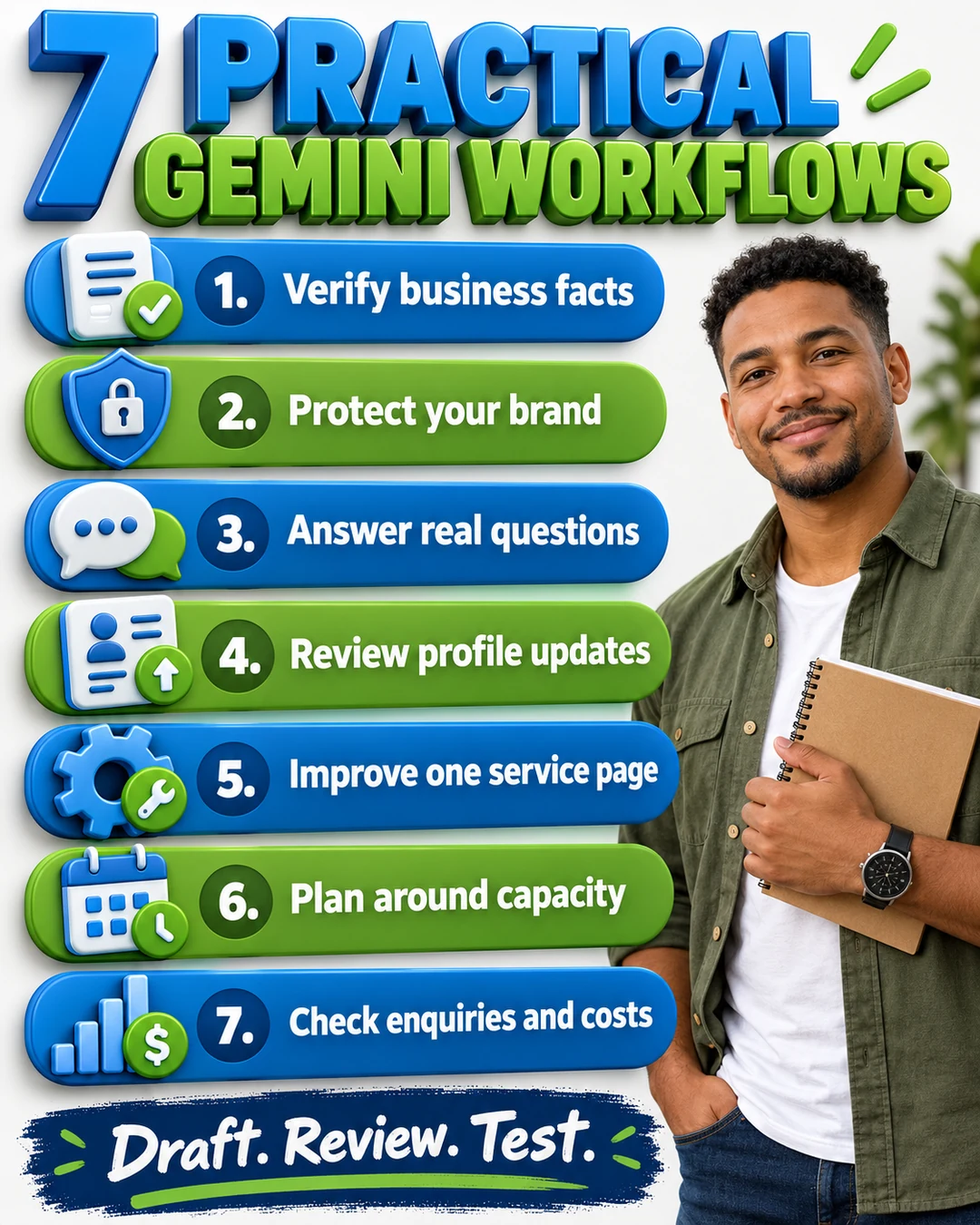
1. Build a business fact sheet before asking for marketing copy
Use Gemini for small business to organise evidence before generating claims. Paste your approved public information and ask the assistant to identify gaps and conflicts. This is more useful than asking it to invent a polished company profile from a business name.
Using only the information below, organise a business fact sheet for a South African service business. Separate confirmed facts, conflicting statements and questions for the owner. Include services, actual coverage, hours, exclusions, contact details and enquiry steps. Do not infer qualifications, prices, testimonials or response times. Return a short list of decisions needed before publication.
For a hypothetical Eastridge electrical contractor, the output might expose an important gap: the website says “Cape Town” but the owner has not approved the full service area. The useful next action is a coverage decision, not another paragraph about serving the whole metro.
Review the result against the source material. If the assistant adds a certificate, emergency service or guarantee that was not supplied, reject the addition. Keep the corrected fact sheet outside the chat as the controlled reference for future work. Date it and name the person responsible for updates.
Finished asset: one approved brief that staff can reuse. Our entity SEO guide explains why clear business identity matters across public sources.
2. Create a brand brief that protects the assets you already own
Google’s brand-style announcement describes using a website, brand kit, fonts or colours to guide visual work. With Gemini for small business, begin with a small approved pack. Keep the original logo and product photography separate from experimental output.
Write a reusable creative brief from this approved brand information. State the audience, message, exact colours, fonts, image treatment and call to action. Treat the supplied logo and product packaging as immutable assets. Do not redraw them or invent endorsements. Give me a review checklist for a designer, not a finished claim about performance.
Imagine a Bellville retailer planning a December collection. A useful brief specifies the actual products, collection point, visual style and enquiry route. “Make it premium” provides too little direction. “Use the approved packshot, leave clear space for the collection details and preserve the label text” gives a reviewer something concrete to check.
Inspect every generated visual for distorted labels, wrong colours, misleading scale and extra fingers or limbs. Use accurate alternative text when the final image is added to a website. A generated lifestyle scene should not be presented as a photograph of a real customer.
Finished asset: a reusable brief and approved visual direction. More consistent output is a production benefit to assess, not evidence that Gemini for small business improves organic visibility.
3. Turn genuine customer questions into useful website answers
Use anonymised questions from enquiry notes, staff experience and public reviews. Ask Gemini for small business assistance with grouping them by customer task. Keep private details out of the input, and do not manufacture questions merely to create a long FAQ.
Group these anonymised customer questions by the decision the customer is trying to make. Identify which need an answer on the service page, a clarification in the enquiry form or an internal staff procedure. Draft short answers using only the fact sheet. Mark anything that needs the owner’s confirmation. Do not create reviews, case studies or unsupported claims.
For a Cape Town tour operator, repeated questions about pickup points, children, walking distance and bad weather suggest useful booking information. The answer to “Is this suitable for my parent?” needs accurate route details. A vague “suitable for everyone” removes the information the customer needs.
Keep concise answers close to relevant headings, then add the necessary conditions. Have someone who understands the service review them. Where another language helps customers, use a competent speaker to check meaning and local usage before publishing a translation.
Google’s guidance on AI-generated content stresses useful added value. Gemini for small business should help organise your knowledge, not multiply generic pages. See our AI content publishing checks before uploading a draft.
4. Prepare accurate Google Business Profile updates

For eligible accounts, Google documents profile updates, review-reply drafts and access to business insights through Gemini. Follow the linked connection instructions; use the manual route if your account does not qualify.
Draft a Google Business Profile update about the verified offer below. State the service, applicable dates, real location or coverage and the next step. Use clear South African English. Do not add a discount, availability claim or guarantee. Show the draft for approval and do not publish or change any profile information.
Suppose a Mitchell’s Plain contractor wants enquiries for planned maintenance. An appropriate update explains the work and quote process. It should not become a 24-hour emergency advert unless that service is confirmed.
When connecting Gemini for small business tasks, use the account that actually controls the profile. Review proposed changes before they take effect. After an authorised update, inspect the live profile and website together. A correct post does not fix an outdated phone number elsewhere.
For review replies, acknowledge the specific issue without exposing the reviewer’s private information. Our Google Business Profile guide and review guidance cover the wider local-search work.
5. Improve one service page and its enquiry questions
The most valuable Gemini for small business draft may be a clearer page, not more social posts. Choose a service with genuine demand and enough capacity to fulfil it. Give the assistant the existing page, approved offer and questions customers repeatedly ask.
Review this service page against the approved fact sheet. Suggest targeted changes that explain who the service helps, what is included, exclusions, actual coverage and how to enquire. Preserve useful existing content and links. Propose three necessary enquiry questions. Do not rewrite the whole page or add prices, credentials or outcomes that are not supplied.
For a hypothetical Bellville upholstery service, the questions could cover the furniture type, number of items and service location. Ask for photographs only if staff need them for assessment. Explain what happens after submission and who confirms the quote. Avoid collecting information merely because a form can hold it.
Accept changes that remove uncertainty. Reject decorative phrases that add length without helping the customer decide. Preserve ranking URLs and working contact actions. A tool’s suggestion to rebuild everything is not a business case.
Before release, test the page on a phone: follow the call link, complete a labelled test enquiry and confirm receipt. Our websites for trades checklist and service-area page guide support that review.
6. Plan Black Friday and December content around fulfilment
Gemini for small business can help sequence seasonal work when the offer is already real. Begin with stock, staffing, opening hours, booking limits and supplier deadlines. A content calendar that ignores those constraints can create enquiries the business cannot fulfil.
Create a four-week content plan for this approved seasonal offer. For each item, specify the customer question, channel, destination page, required asset, reviewer and publication date. Use the stock and capacity limits supplied. Do not invent scarcity, discounts or booking availability. Flag any dependency that could make the message inaccurate.
For a Cape Town tour operator, early content can answer planning questions, later posts can explain the booking process and the final updates can show only confirmed availability. For a retailer, separate interest from a paid, confirmed order. State collection and delivery conditions accurately.
Use one approved offer across the website, profile and social channels while adapting the format. Do not paste identical blocks everywhere. When an offer changes, update its destination and remove expired claims from scheduled posts.
Tourism businesses can use our Cape Town December planning guide to understand visitor questions. Gemini for small business is useful for organising the work; staff still confirm the actual experience, route and booking conditions.
7. Review enquiries and costs without sharing customer records
Start with a small, anonymised summary you can check yourself. Suggested fields are week, enquiry source, offer, enquiry count, qualified count, completed sales, direct costs and staff review time. Mark missing data as unknown, not zero.
Analyse this anonymised enquiry summary. Check totals first. Separate observations from assumptions. Compare enquiry quality and completed sales by source, explain the denominators and identify missing information. Do not infer causation or forecast revenue from this small sample. Recommend one question for the next review and show the arithmetic.
A hypothetical example: an owner previously spent 90 minutes preparing a weekly update. Drafting now takes 20 minutes and checking takes 25. The measured saving is 45 minutes, not 70. If inaccurate claims create another hour of correction, the workflow has not saved time.
Likewise, eight suitable enquiries from 20 total enquiries is 40%. That ratio says nothing about sales unless the outcome is recorded. Gemini for small business can help explain the summary; compare every calculation with the source sheet.
Keep paid traffic, organic search and AI referrals distinguishable. Our measurement guide explains the reporting problem. Use fictional or aggregated data for practice, and involve the responsible professional where financial or legal judgement is required.
The Easy Rank exercise: one offer, one page, one enquiry
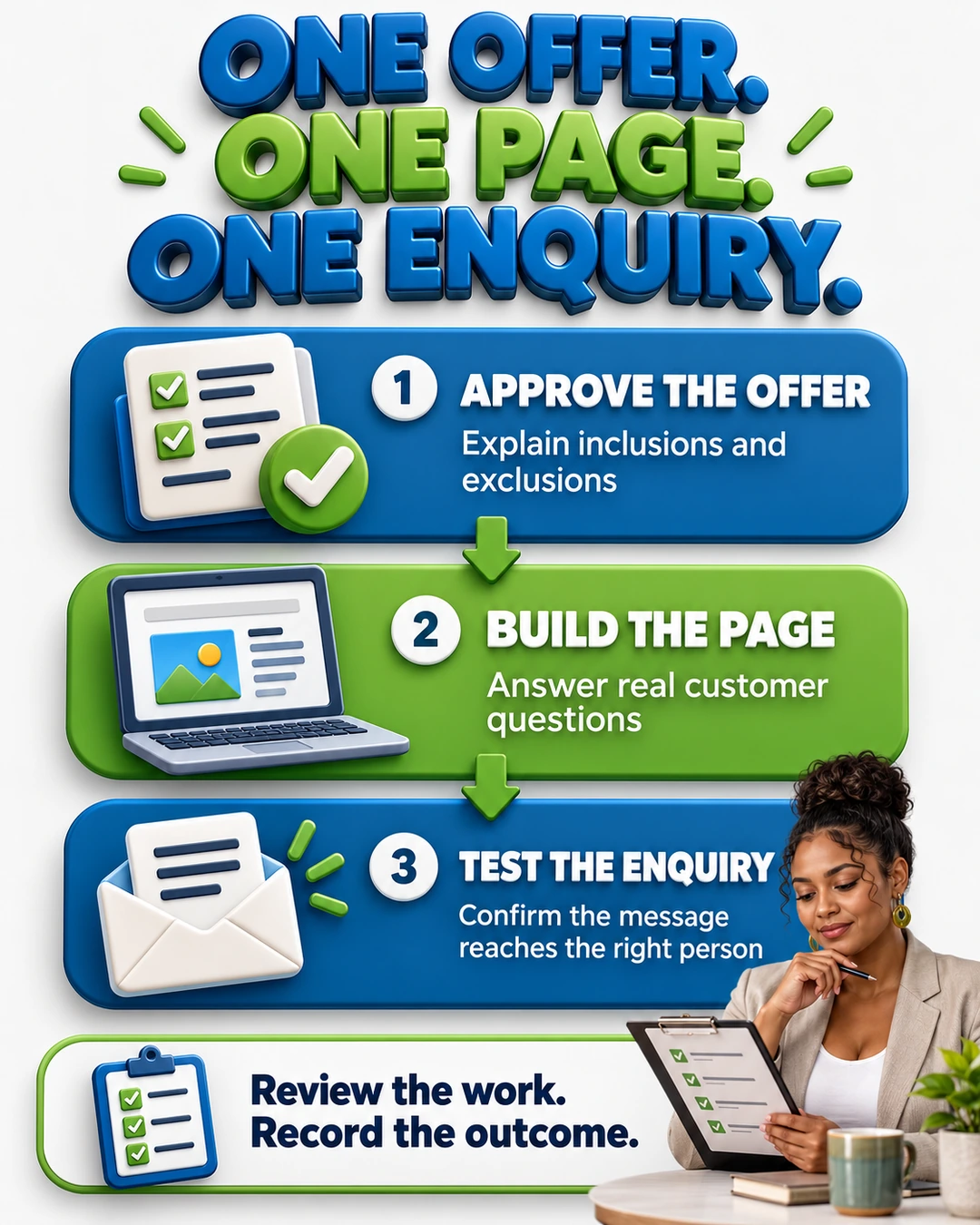
Bring the seven workflows together around one manageable job. For a hypothetical Lentegeur contractor, the offer might be a planned assessment for a defined type of work. The destination explains the scope and quote process. The enquiry asks for the suburb, job description and contact preference. None of this establishes that a named business offers that service.
- Approve the offer: write down what is included, excluded and awaiting confirmation.
- Improve the destination: answer the questions needed to decide whether to enquire.
- Prepare one supporting update: send the customer to that relevant page.
- Test the enquiry: confirm the message reaches the correct person and the customer sees a useful acknowledgement.
- Review the outcome: record qualified enquiries, completed work and the time spent producing and correcting the assets.
This exercise gives Gemini for small business a defined purpose. A useful result is a working journey with accurate information. A large volume of drafts is not the acceptance test. Businesses owned by women, Khoi and San entrepreneurs and other Cape Flats founders should be represented through their actual offers and knowledge, rather than generic assumptions about their customers.
A practical first-week plan
On day one, confirm the account, permitted information and priority task. On day two, approve the fact sheet. Use days three and four to prepare and review one page and one supporting message. On day five, test the enquiry journey. At the end of the week, compare production time, correction time and any early customer feedback.
Keep a short decision log: what changed, who checked it, where it was published and what needs reviewing next. If Gemini for small business is taking longer than the original task, simplify the brief or choose a different job. Do not buy additional tools until you know which limitation is preventing useful work.
Does using Gemini improve Google rankings or AI recommendations?
Using Gemini is not a documented shortcut to rankings or recommendations. Google’s AI search guidance says established SEO practices remain relevant and there are no special additional technical requirements for AI Overviews or AI Mode. That guidance concerns Google Search; it is not a guarantee about Gemini responses.
Useful content still needs a crawlable website, clear business information and a working customer journey. Measure content production, search visibility, AI referrals and qualified enquiries separately. If your goal is to be discovered, use our AI visibility audit checklist alongside the production workflows.
Gemini for small business: frequently asked questions
Is Gemini free for small businesses in South Africa?
Start by checking the access available in your account. Features and usage limits vary, and paid upgrades offer different access. Do not assume the new business tools, Workspace services and Enterprise products share one price or entitlement.
Can Gemini manage my Google Business Profile?
Eligible owners can connect a profile in the Gemini web app. Check the current requirements linked above before relying on the connection. If you do not qualify, use approved drafts and make the profile updates manually.
Can Gemini for small business write my website content?
It can help organise information and prepare drafts. The business must verify service details, claims and useful local information. Review the draft and test the page before publishing. Bulk generic output is not a substitute for original value.
Should I upload customer information to Gemini?
Begin with public, fictional or aggregated information. Check the account’s data arrangements and your organisation’s permissions before sharing confidential material. Do not treat a business-themed interface as proof that every upload is appropriate.
Which task should a small business try first?
Choose one repeated task with clear inputs and an output you can verify. Improving an existing service explanation or preparing an approved update is often easier to assess than automating a complete marketing operation.
Can Easy Rank help with Gemini for small business?
Yes. Request a scoped review of the business brief, content workflow, website destination and measurement needs. Our Gemini business setup support explains what can be included and how responsibilities are agreed.
Make your first Gemini workflow useful
Send Easy Rank your website, the task taking too much owner time and the customer action you want to improve. We can scope a practical workflow and the website changes needed to support it. Request a tailored proposal. Software subscriptions and advertising spend are agreed separately where relevant.
About the author

David Gous is the founder of Easy Rank, a division of Bizconnexity, working with South African businesses on websites, SEO and AI search visibility. This guide combines current Google documentation with original planning prompts and hypothetical local examples. It does not claim completed Gemini integrations or measured client results.
Sources and editorial method
Google sources were checked on 27 October 2026. Product descriptions and eligibility statements follow the linked documentation. The prompts, review process and local scenarios are Easy Rank’s recommendations, not Google instructions or observed account walkthroughs. Recheck the relevant feature guidance before connecting an account or publishing changes.